Latest Post

  Today I share a Epson Adjustment Program. 

Epson R-390 Resetter Adjustment Program or Resetter. 


Why this software  or Program.?

Ans.

Because, This is Epson Waste/ink Pad Cleaning software.

When your Epson Printer Reach the limit of printing then your printer show message to you.  

“Service management requirement” like this.  


Download This Epson R-390 Resetter Free.

How to use this resetter:


First Download it (Epson R-390 Resetter).

After Unzip file & click the Adjpro.Exe .

Now Click the Particular adjustment mode.


Then show this image & select the Waste ink Pad Counter & Click OK.

Now Check the Two box like this Top image & Click Initialization Button. 

Carefuller this time, 

Properly connect  your printer with computer. 

When you click that button it show you below image.


Now Click OK & wait for install the reset program in your Printer. 

Let after it will show you a message “Please turn off your printer”. 

Then Turn off your printer & click the OK button & Again Power on your printer.

Now see your Printer is OK.


Necessary Help:

Password:

Call: 01797464478

Imo: 01797464478

FACEBOOK

  Today I share a Epson Adjustment Program. 

Epson R260  Resetter Adjustment Program or Resetter. 


Why this software  or Program.?

Ans.

Because, This is Epson Waste/ink Pad Cleaning software.

When your Epson Printer Reach the limit of printing then your printer show message to you.  

“Service management requirement” like this.  


Download This Epson R-380 Resetter Free.

How to use this resetter:


Epson R-380 Resetter keygen Free dawnload


First Download it (Epson R-380 Resetter).

After Unzip file & click the Adjpro.Exe .

Now Click the Particular adjustment mode.


Epson R-380 Resetter keygen Free dawnload


Then show this image & select the Waste ink Pad Counter & Click OK.

Now Check the Two box like this Top image & Click Initialization Button. 

Carefuller this time, 

Properly connect  your printer with computer. 

When you click that button it show you below image.

Epson R-380 Resetter keygen Free dawnload


Now Click OK & wait for install the reset program in your Printer. 

Let after it will show you a message “Please turn off your printer”. 

Then Turn off your printer & click the OK button & Again Power on your printer.

Now see your Printer is OK.


Necessary Help:

Password

Call: 01797464478

Imo: 01797464478

FACEBOOK

  Today I share a Epson Adjustment Program. 

Epson R260  Resetter Adjustment Program or Resetter. 


Why this software  or Program.?

Ans.

Because, This is Epson Waste/ink Pad Cleaning software.

When your Epson Printer Reach the limit of printing then your printer show message to you.  

“Service management requirement” like this.  


Download This Epson R265  Resetter Free.

How to use this resetter:


First Download it (Epson R265  Resetter).

After Unzip file & click the Adjpro.Exe .

Now Click the Particular adjustment mode.


Then show this image & select the Waste ink Pad Counter & Click OK.

Now Check the Two box like this Top image & Click Initialization Button. 

Carefuller this time, 

Properly connect  your printer with computer. 

When you click that button it show you below image.


Now Click OK & wait for install the reset program in your Printer. 

Let after it will show you a message “Please turn off your printer”. 

Then Turn off your printer & click the OK button & Again Power on your printer.

Now see your Printer is OK.


Necessary Help:

Password

Call: 01797464478

Imo: 01797464478

FACEBOOK

  Today I share a Epson Adjustment Program.

Epson R-360 Resetter keygen Free dawnload

Epson R-360  Resetter Adjustment Program or Resetter.


Why this software  or Program.?
Ans.
Because, This is Epson Waste/ink Pad Cleaning software.
When your Epson Printer Reach the limit of printing then your printer show message to you.  
“Service management requirement” like this.  


Download This Epson R-360 Resetter Free.
How to use this resetter:


First Download it (Epson R-360 Resetter).
After Unzip file & click the Adjpro.Exe .
Now Click the Particular adjustment mode.


Then show this image & select the Waste ink Pad Counter & Click OK.
Now Check the Two box like this Top image & Click Initialization Button.
Carefuller this time,
Properly connect  your printer with computer.
When you click that button it show you below image.


Now Click OK & wait for install the reset program in your Printer.
Let after it will show you a message “Please turn off your printer”.
Then Turn off your printer & click the OK button & Again Power on your printer.
Now see your Printer is OK.

Necessary Help:

Call: 01797464478
Imo: 01797464478
FACEBOOK


  Today I share a Epson Adjustment Program. 

Epson R-330 Resetter Adjustment Program or Resetter. 


Why this software  or Program.?

Ans.

Because, This is Epson Waste/ink Pad Cleaning software.

When your Epson Printer Reach the limit of printing then your printer show message to you.  

“Service management requirement” like this.  


Download This Epson R-330 Resetter Free.

How to use this resetter:


Epson R-330 Resetter keygen Free dawnload


First Download it (Epson R-330 Resetter).

After Unzip file & click the Adjpro.Exe .

Now Click the Particular adjustment mode.

Epson R-330 Resetter keygen Free dawnload


Then show this image & select the Waste ink Pad Counter & Click OK.

Now Check the Two box like this Top image & Click Initialization Button. 

Carefuller this time, 

Properly connect  your printer with computer. 

When you click that button it show you below image.


Epson R-330 Resetter keygen Free dawnload


Now Click OK & wait for install the reset program in your Printer. 

Let after it will show you a message “Please turn off your printer”. 

Then Turn off your printer & click the OK button & Again Power on your printer.

Now see your Printer is OK.


Necessary Help:


Call: 01797464478

Imo: 01797464478

FACEBOOK

  Today I share a Epson Adjustment Program. 

Epson R-300-R-310-R-320  Resetter Adjustment Program or Resetter. 


Why this software  or Program.?

Ans.

Because, This is Epson Waste/ink Pad Cleaning software.

When your Epson Printer Reach the limit of printing then your printer show message to you.  

“Service management requirement” like this.  


Download This Epson R-300-R-310-R-320 Resetter Free.

How to use this resetter:


First Download it (Epson R-300-R-310-R-320 Resetter).

After Unzip file & click the Adjpro.Exe .

Now Click the Particular adjustment mode.


Then show this image & select the Waste ink Pad Counter & Click OK.

Now Check the Two box like this Top image & Click Initialization Button. 

Carefuller this time, 

Properly connect  your printer with computer. 

When you click that button it show you below image.


Now Click OK & wait for install the reset program in your Printer. 

Let after it will show you a message “Please turn off your printer”. 

Then Turn off your printer & click the OK button & Again Power on your printer.

Now see your Printer is OK.


Necessary Help:


Call: 01797464478

Imo: 01797464478

FACEBOOK

  Today I share a Epson Adjustment Program. 

Epson R295  Resetter Adjustment Program or Resetter. 


Why this software  or Program.?

Ans.

Because, This is Epson Waste/ink Pad Cleaning software.

When your Epson Printer Reach the limit of printing then your printer show message to you.  

“Service management requirement” like this.  


Download This Epson R295  Resetter Free.

How to use this resetter:

Epson R295 Resetter keygen Free dawnload


First Download it (Epson R295  Resetter).

After Unzip file & click the Adjpro.Exe .

Now Click the Particular adjustment mode.


Epson R295 Resetter keygen Free dawnload


Then show this image & select the Waste ink Pad Counter & Click OK.

Now Check the Two box like this Top image & Click Initialization Button. 

Carefuller this time, 

Properly connect  your printer with computer. 

When you click that button it show you below image.


Epson R295 Resetter keygen Free dawnload


Now Click OK & wait for install the reset program in your Printer. 

Let after it will show you a message “Please turn off your printer”. 

Then Turn off your printer & click the OK button & Again Power on your printer.

Now see your Printer is OK.


Necessary Help:

Call: 01797464478

Imo: 01797464478

FACEBOOK

  Today I share a Epson Adjustment Program. 

Epson R290  Resetter Adjustment Program or Resetter. 

Why this software  or Program.?

Ans.

Because, This is Epson Waste/ink Pad Cleaning software.

When your Epson Printer Reach the limit of printing then your printer show message to you.  

“Service management requirement” like this.  

Download This Epson R290 Resetter Free.

How to use this resetter:


Epson R290 Resetter keygen Free dawnload


First Download it (Epson R290  Resetter).

After Unzip file & click the Adjpro.Exe .

Now Click the Particular adjustment mode.

Epson R290 Resetter keygen Free dawnload


Then show this image & select the Waste ink Pad Counter & Click OK.

Now Check the Two box like this Top image & Click Initialization Button. 

Carefuller this time, 

Properly connect  your printer with computer. 

When you click that button it show you below image.


Epson R290 Resetter keygen Free dawnload


Now Click OK & wait for install the reset program in your Printer. 

Let after it will show you a message “Please turn off your printer”. 

Then Turn off your printer & click the OK button & Again Power on your printer.

Now see your Printer is OK.


Necessary Help:


Call: 01797464478

Imo: 01797464478


  Today I share a Epson Adjustment Program. 

Epson R260  Resetter Adjustment Program or Resetter. 


Why this software  or Program.?

Ans.

Because, This is Epson Waste/ink Pad Cleaning software.

When your Epson Printer Reach the limit of printing then your printer show message to you.  

“Service management requirement” like this.  


Download This Epson R285  Resetter Free.

How to use this resetter:


Epson R285 Resetter keygen Free dawnload


First Download it (Epson R285  Resetter).

After Unzip file & click the Adjpro.Exe .

Now Click the Particular adjustment mode.


Epson R285 Resetter keygen Free dawnload


Then show this image & select the Waste ink Pad Counter & Click OK.

Now Check the Two box like this Top image & Click Initialization Button. 

Carefuller this time, 

Properly connect  your printer with computer. 

When you click that button it show you below image.


Epson R285 Resetter keygen Free dawnload


Now Click OK & wait for install the reset program in your Printer. 

Let after it will show you a message “Please turn off your printer”. 

Then Turn off your printer & click the OK button & Again Power on your printer.

Now see your Printer is OK.


Necessary Help:


Call: 01797464478

Imo: 01797464478

FACEBOOK

 Today I share a Epson Adjustment Program. 

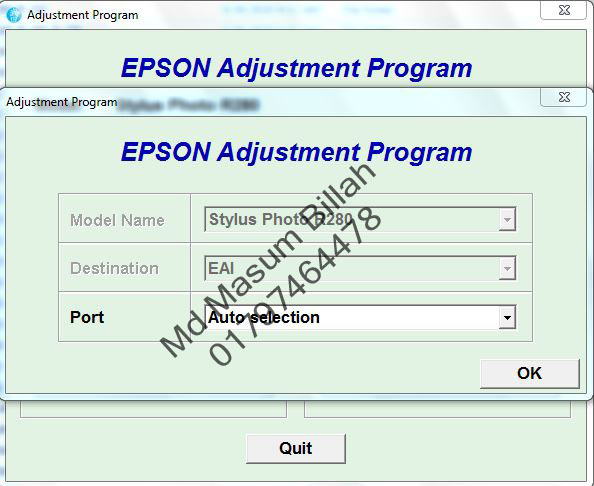
Epson R280  Resetter Adjustment Program or Resetter. 


Why this software  or Program.?

Ans.

Because, This is Epson Waste/ink Pad Cleaning software.

When your Epson Printer Reach the limit of printing then your printer show message to you.  

“Service management requirement” like this.  


Epson R280 Resetter keygen Free dawnload


Download This Epson R280  Resetter Free.

How to use this resetter:


First Download it (Epson R280  Resetter).

After Unzip file & click the Adjpro.Exe .

Now Click the Particular adjustment mode.


Epson R280 Resetter keygen Free dawnload


Then show this image & select the Waste ink Pad Counter & Click OK.

Now Check the Two box like this Top image & Click Initialization Button. 

Carefuller this time, 

Properly connect  your printer with computer. 

When you click that button it show you below image.


Epson R280 Resetter keygen Free dawnload


Now Click OK & wait for install the reset program in your Printer. 

Let after it will show you a message “Please turn off your printer”. 

Then Turn off your printer & click the OK button & Again Power on your printer.

Now see your Printer is OK.


Necessary Help:


Call: 01797464478

Imo: 01797464478

FACEBOOK

 Today I share a Epson Adjustment Program. 

Epson R275 Resetter Adjustment Program or Resetter. 


Why this software  or Program.?

Ans.

Because, This is Epson Waste/ink Pad Cleaning software.

When your Epson Printer Reach the limit of printing then your printer show message to you.  

“Service management requirement” like this.  


Epson R275 Resetter keygen Free dawnload


Download This Epson R275 Resetter Free.

How to use this resetter:


Epson R275 Resetter keygen Free dawnload


First Download it (Epson R275 Resetter).

After Unzip file & click the Adjpro.Exe .

Now Click the Particular adjustment mode.


Epson R275 Resetter keygen Free dawnload


Then show this image & select the Waste ink Pad Counter & Click OK.

Now Check the Two box like this Top image & Click Initialization Button. 

Carefuller this time, 

Properly connect  your printer with computer. 

When you click that button it show you below image.


Epson R275 Resetter keygen Free dawnload


Now Click OK & wait for install the reset program in your Printer. 

Let after it will show you a message “Please turn off your printer”. 

Then Turn off your printer & click the OK button & Again Power on your printer.

Now see your Printer is OK.


Necessary Help:

Password

Call: 01797464478

Imo: 01797464478

 Today I share a Epson Adjustment Program. 

Epson R270 Resetter Adjustment Program or Resetter. 


Why this software  or Program.?

Ans.

Because, This is Epson Waste/ink Pad Cleaning software.

When your Epson Printer Reach the limit of printing then your printer show message to you.  

“Service management requirement” like this.  

Epson R270 Resetter keygen Free dawnload


Download This Epson R270 Resetter Free.

How to use this resetter:


Epson R270 Resetter keygen Free dawnload


First Download it (Epson R270 Resetter).

After Unzip file & click the Adjpro.Exe .

Now Click the Particular adjustment mode.


Epson R270 Resetter keygen Free dawnload


Then show this image & select the Waste ink Pad Counter & Click OK.

Now Check the Two box like this Top image & Click Initialization Button. 

Carefuller this time, 

Properly connect  your printer with computer. 

When you click that button it show you below image.


Epson R270 Resetter keygen Free dawnload


Now Click OK & wait for install the reset program in your Printer. 

Let after it will show you a message “Please turn off your printer”. 

Then Turn off your printer & click the OK button & Again Power on your printer.

Now see your Printer is OK.


Necessary Help:


Call: 01797464478

Imo: 01797464478

FACEBOOK

MKRdezign

Contact Form

Name

Email *

Message *

Powered by Blogger.
Please WaitPlease Enable Javascript To See All Widget