Latest Post

Today I share a Epson Adjustment Program. 
Epson L1800 Adjustment Program or Resetter. 

Why this software  or Program.?
Ans.
Because, This is Epson Waste/ink Pad Cleaning software.
When your Epson Printer Reach the limit of printing then your printer show message to you.  
“Service management requirement” like this.  

Download This Epson L1800 Resetter Free.
How to use this resetter:

First Download it (Epson L1800 Resetter).
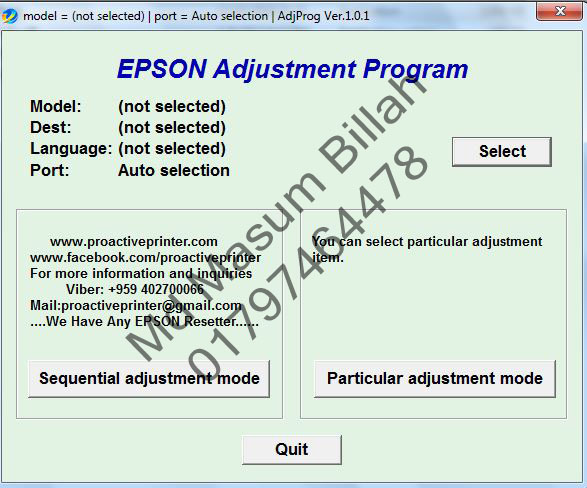
After Unzip file & click the Adjpro.Exe .
Now Click the Particular adjustment mode.


Epson L1800 Resetter + Keygen Free Dawnload


Then show this image & select the Waste ink Pad Counter & Click OK.
Now Check the Two box like this Top image & Click Initialization Button. 
Carefuller this time, 


Properly connect  your printer with computer. 
When you click that button it show you below image.


Now Click OK & wait for install the reset program in your Printer. 
Let after it will show you a message “Please turn off your printer”. 
Then Turn off your printer & click the OK button & Again Power on your printer.
Now see your Printer is OK.

আজ আমি একটি এপসন সামঞ্জস্য প্রোগ্রাম ভাগ করে নিই।
অ্যাপসন এল 1800 অ্যাডজাস্টমেন্ট প্রোগ্রাম বা রিসেটর।

কেন এই সফ্টওয়্যার বা প্রোগ্রাম।?
উঃ
কারণ, এটি অ্যাপসন বর্জ্য / কালি প্যাড ক্লিনিং সফ্টওয়্যার।
যখন আপনার অ্যাপসন প্রিন্টার মুদ্রণের সীমাতে পৌঁছে যায় তখন আপনার মুদ্রক আপনাকে বার্তা প্রদর্শন করে।
"পরিষেবা পরিচালনার প্রয়োজনীয়তা" এর মতো।

এই অ্যাপসন এল 1800 রিসেটরটি ফ্রি ডাউনলোড করুন।
এই রিসেটরটি কীভাবে ব্যবহার করবেন:


প্রথমে এটি ডাউনলোড করুন (অ্যাপসন এল 1800 রিসেটর)।
ফাইল আনজিপ করার পরে অ্যাডজপ্রো.এক্সে ক্লিক করুন।
এবার পার্টিকুলার অ্যাডজাস্টমেন্ট মোডে ক্লিক করুন।


Epson L1800 Resetter + Keygen Free Dawnload

তারপরে এই চিত্রটি দেখান এবং বর্জ্য কালি প্যাড কাউন্টার নির্বাচন করুন এবং ওকে ক্লিক করুন।
এখন এই শীর্ষ চিত্রের মতো দুটি বাক্স চেক করুন এবং সূচনা বোতামটি ক্লিক করুন।
যত্নশীল এইবার,
 
আপনার মুদ্রকটিকে কম্পিউটারের সাথে সঠিকভাবে সংযুক্ত করুন।
আপনি যখন সেই বোতামটি ক্লিক করেন এটি আপনাকে চিত্রের নীচে দেখায়।
এখন ওকে ক্লিক করুন এবং আপনার প্রিন্টারে রিসেট প্রোগ্রামটি ইনস্টল করার জন্য অপেক্ষা করুন।
এর পরে আপনাকে একটি বার্তা দেখাবে "দয়া করে আপনার প্রিন্টারটি বন্ধ করুন"।
তারপরে আপনার প্রিন্টারটি বন্ধ করে দিন এবং আপনার মুদ্রকটিতে ঠিক আছে বাটন এবং পুনরায় শক্তি ক্লিক করুন।
এখন দেখুন আপনার প্রিন্টার ঠিক আছে।
Click now 

Dawnload


Call: 01797464478
Imo: 01797464478
Gmail: mmsoftmnm@gmail.com
Epson L1800 Resetter + Keygen Free Dawnload


Epson 1300 Resetter + Keygen Free Dawnload

Epson 1300 Resetter + Keygen Free Dawnload


Rule to use Epson 1300  Resetter Software : 
Twofold click Adjprog.exe. 

The going hand in hand with screen appears. Press the "Recognize" 
Press the "Particular Adjustment mode"

On the accompanying screen select Model Name "1300" as the going hand in hand with screen and thereafter the OK get. 

Select the "Waste ink pad counter" and a short time later click "okay" 
Select the "Check" to recoup the current worth. By then Pressing the get "Instatement" to reset the 
counter to zero. 
Press the "okay" and the counter will be reset. 

Turn off the printer as a venture prepared then turn on afresh. 
Press "Finish" to close the screen. 

Close the item. Pressing the "Past"
In the accompanying screen, click "Qut.

Click Now Dawnload


Call: 01797464478
Imo: 01797464478
Gmail: mmsoftmnm@gmail.com

Epson L810-L850 Resetter + Keygen Free Dawnload

Epson L810-L850 Resetter + Keygen Free Dawnload


Rule to use Epson L810-L850  Resetter Software : 
Twofold click Adjprog.exe. 

The going hand in hand with screen appears. Press the "Recognize" 
Press the "Particular Adjustment mode"

On the accompanying screen select Model Name "L810-L850" as the going hand in hand with screen and thereafter the OK get. 

Select the "Waste ink pad counter" and a short time later click "okay" 
Select the "Check" to recoup the current worth. By then Pressing the get "Instatement" to reset the 
counter to zero. 
Press the "okay" and the counter will be reset. 

Turn off the printer as a venture prepared then turn on afresh. 
Press "Finish" to close the screen. 

Close the item. Pressing the "Past"
In the accompanying screen, click "Qut.

Click now Dawnload


Call: 01797464478
Imo: 01797464478
Gmail: mmsoftmnm@gmail.com

Epson L805 Resetter + Keygen Free Dawnload

Epson L805 Resetter + Keygen Free Dawnload


Rule to use Epson L805  Resetter Software : 
Twofold click Adjprog.exe. 

The going hand in hand with screen appears. Press the "Recognize" 
Press the "Particular Adjustment mode"

On the accompanying screen select Model Name "L805" as the going hand in hand with screen and thereafter the OK get. 

Select the "Waste ink pad counter" and a short time later click "okay" 
Select the "Check" to recoup the current worth. By then Pressing the get "Instatement" to reset the 
counter to zero. 
Press the "okay" and the counter will be reset. 

Turn off the printer as a venture prepared then turn on afresh. 
Press "Finish" to close the screen. 

Close the item. Pressing the "Past"
In the accompanying screen, click "Qut.

Click now Dawnload


Call: 01797464478
Imo: 01797464478
Gmail: mmsoftmnm@gmail.com

Epson L800 Resetter + Keygen Free Dawnload

Epson L800 Resetter + Keygen Free Dawnload


Rule to use Epson L800  Resetter Software : 
Twofold click Adjprog.exe. 

The going hand in hand with screen appears. Press the "Recognize" 
Press the "Particular Adjustment mode"

On the accompanying screen select Model Name "L800" as the going hand in hand with screen and thereafter the OK get. 

Select the "Waste ink pad counter" and a short time later click "okay" 
Select the "Check" to recoup the current worth. By then Pressing the get "Instatement" to reset the 
counter to zero. 
Press the "okay" and the counter will be reset. 

Turn off the printer as a venture prepared then turn on afresh. 
Press "Finish" to close the screen. 

Close the item. Pressing the "Past"
In the accompanying screen, click "Qut.

Click now Dawnload


Call: 01797464478
Imo: 01797464478
Gmail: mmsoftmnm@gmail.com

Epson L565 Resetter + Keygen Free Dawnload

Epson L565 Resetter + Keygen Free Dawnload


Rule to use Epson L565 Resetter Software : 
Twofold click Adjprog.exe. 

The going hand in hand with screen appears. Press the "Recognize" 
Press the "Particular Adjustment mode"

On the accompanying screen select Model Name "L565" as the going hand in hand with screen and thereafter the OK get. 

Select the "Waste ink pad counter" and a short time later click "okay" 
Select the "Check" to recoup the current worth. By then Pressing the get "Instatement" to reset the 
counter to zero. 
Press the "okay" and the counter will be reset. 

Turn off the printer as a venture prepared then turn on afresh. 
Press "Finish" to close the screen. 

Close the item. Pressing the "Past"
In the accompanying screen, click "Qut.

Click now Dawnload


Call: 01797464478
Imo: 01797464478
Gmail: mmsoftmnm@gmail.com

Epson L500-L510-L520-L540-L550 Resetter + Keygen Free Dawnload


Epson L500-L510-L520-L540-L550 Resetter + Keygen Free Dawnload


Rule to use Epson L500-L510-L520-L540-L550  Resetter Software : 
Twofold click Adjprog.exe. 

The going hand in hand with screen appears. Press the "Recognize" 
Press the "Particular Adjustment mode"

On the accompanying screen select Model Name "L500-L510-L520-L540-L550" as the going hand in hand with screen and thereafter the OK get. 

Select the "Waste ink pad counter" and a short time later click "okay" 
Select the "Check" to recoup the current worth. By then Pressing the get "Instatement" to reset the 
counter to zero. 
Press the "okay" and the counter will be reset. 

Turn off the printer as a venture prepared then turn on afresh. 
Press "Finish" to close the screen. 

Close the item. Pressing the "Past"
In the accompanying screen, click "Qut.

Click now Dawnload

Call: 01797464478
Imo: 01797464478
Gmail: mmsoftmnm@gmail.com

Epson L455 Resetter + Keygen Free Dawnload

Epson L455 Resetter + Keygen Free Dawnload


Rule to use Epson L455   Resetter Software : 
Twofold click Adjprog.exe. 

The going hand in hand with screen appears. Press the "Recognize" 
Press the "Particular Adjustment mode"

On the accompanying screen select Model Name "L455 " as the going hand in hand with screen and thereafter the OK get. 

Select the "Waste ink pad counter" and a short time later click "okay" 
Select the "Check" to recoup the current worth. By then Pressing the get "Instatement" to reset the 
counter to zero. 
Press the "okay" and the counter will be reset. 

Turn off the printer as a venture prepared then turn on afresh. 
Press "Finish" to close the screen. 

Close the item. Pressing the "Past"
In the accompanying screen, click "Qut.

Click now Dawnload

Call: 01797464478
Imo: 01797464478
Gmail: mmsoftmnm@gmail.com

Epson L375-L475 Resetter + Keygen Free Dawnload


Epson L375-L475 Resetter + Keygen Free Dawnload

Rule to use Epson L375-L475 Resetter Software : 
Twofold click Adjprog.exe. 

The going hand in hand with screen appears. Press the "Recognize" 
Press the "Particular Adjustment mode"

On the accompanying screen select Model Name " L375-L475" as the going hand in hand with screen and thereafter the OK get. 

Select the "Waste ink pad counter" and a short time later click "okay" 
Select the "Check" to recoup the current worth. By then Pressing the get "Instatement" to reset the 
counter to zero. 
Press the "okay" and the counter will be reset. 

Turn off the printer as a venture prepared then turn on afresh. 
Press "Finish" to close the screen. 

Close the item. Pressing the "Past"
In the accompanying screen, click "Qut.

Click now Dawnload

Call: 01797464478
Imo: 01797464478
Gmail: mmsoftmnm@gmail.com

Epson L200 Resetter + Keygen Free Dawnload


Epson L200 Resetter + Keygen Free Dawnload


Rule to use Epson L200  Resetter Software : 
Twofold click Adjprog.exe. 
The going hand in hand with screen appears.  Press the "Recognize" 
Press the "Particular Adjustment mode"
On the accompanying screen select Model Name " L200" as the going hand in hand with screen and thereafter the OK get. 
Select the "Waste ink pad counter" and a short time later click "okay" 
Select the "Check" to recoup the current worth. By then Pressing the get "Instatement" to reset the 
counter to zero. 
Press the "okay" and the counter will be reset. 
Turn off the printer as a venture prepared then turn on afresh. 
Press "Finish" to close the screen. 
Close the item. Pressing the "Past"
In the accompanying screen, click "Qut.
Call: 01797464478
Imo: 01797464478
Gmail: mmsoftmnm@gmail.com

Epson L120 Resetter + Keygan Free Dawnload.


Epson L120 Resetter + Keygan Free Dawnload


Rule to use Epson L100 Resetter Software : 
Twofold click Adjprog.exe. 

The going hand in hand with screen appears. Press the "Recognize" 
Press the "Particular Adjustment mode"

On the accompanying screen select Model Name "L120" as the going hand in hand with screen and thereafter the OK get. 

Select the "Waste ink pad counter" and a short time later click "okay" 
Select the "Check" to recoup the current worth. By then Pressing the get "Instatement" to reset the 
counter to zero. 
Press the "okay" and the counter will be reset. 

Turn off the printer as a venture prepared then turn on afresh. 
Press "Finish" to close the screen. 

Close the item. Pressing the "Past"
In the accompanying screen, click "Qut.

Click now Dawnload

Call: 01797464478
Gmail: mmsoftmnm@gmail.com

Today I share a Epson Adjustment Program. 
Epson L110-L210-L300-L350-L355-L550-L555 Adjustment Program or Resetter. 

Why this software  or Program.?
Ans.
Because, This is Epson Waste/ink Pad Cleaning software.
When your Epson Printer Reach the limit of printing then your printer show message to you.  
“Service management requirement” like this.  

Download This Epson L110-L210-L300-L350-L355-L550-L555 Resetter Free.
How to use this resetter:

First Download it (Epson L110-L210-L300-L350-L355-L550-L555 Resetter).
After Unzip file & click the Adjpro.Exe .
Now Click the Particular adjustment mode.

Epson L110-L210-L300-L350-L355-L550-L555 Resetter + Keygan Free Dawnload


Then show this image & select the Waste ink Pad Counter & Click OK.
Now Check the Two box like this Top image & Click Initialization Button. 
Carefuller this time, 


Properly connect  your printer with computer. 
When you click that button it show you below image.


Now Click OK & wait for install the reset program in your Printer. 
Let after it will show you a message “Please turn off your printer”. 
Then Turn off your printer & click the OK button & Again Power on your printer.
Now see your Printer is OK.
আজ আমি একটি এপসন সামঞ্জস্য প্রোগ্রাম ভাগ করে নিই।
অ্যাপসন L110-L210-L300-L350-L355-L550-L555 অ্যাডজাস্টমেন্ট প্রোগ্রাম বা রিসেটর।

কেন এই সফ্টওয়্যার বা প্রোগ্রাম।?
উঃ
কারণ, এটি অ্যাপসন বর্জ্য / কালি প্যাড ক্লিনিং সফ্টওয়্যার।
যখন আপনার অ্যাপসন প্রিন্টার মুদ্রণের সীমাতে পৌঁছে যায় তখন আপনার মুদ্রক আপনাকে বার্তা প্রদর্শন করে।
"পরিষেবা পরিচালনার প্রয়োজনীয়তা" এর মতো।

এই অ্যাপসন L110-L210-L300-L350-L355-L550-L555 রিসেটর বিনামূল্যে ডাউনলোড করুন।
এই রিসেটরটি কীভাবে ব্যবহার করবেন:


প্রথমে এটি ডাউনলোড করুন (অ্যাপসন এল 110-এল 210-এল300-এল350-এল 355-এল 550-এল 555 রিসেটর)।
ফাইল আনজিপ করার পরে অ্যাডজপ্রো.এক্সে ক্লিক করুন।
এবার পার্টিকুলার অ্যাডজাস্টমেন্ট মোডে ক্লিক করুন।
Epson L110-L210-L300-L350-L355-L550-L555 Resetter + Keygan Free Dawnload

তারপরে এই চিত্রটি দেখান এবং বর্জ্য কালি প্যাড কাউন্টার নির্বাচন করুন এবং ওকে ক্লিক করুন।
এখন এই শীর্ষ চিত্রের মতো দুটি বাক্স চেক করুন এবং সূচনা বোতামটি ক্লিক করুন।
যত্নশীল এইবার,
আপনার মুদ্রকটিকে কম্পিউটারের সাথে সঠিকভাবে সংযুক্ত করুন।
আপনি যখন সেই বোতামটি ক্লিক করেন এটি আপনাকে চিত্রের নীচে দেখায়।
এখন ওকে ক্লিক করুন এবং আপনার প্রিন্টারে রিসেট প্রোগ্রামটি ইনস্টল করার জন্য অপেক্ষা করুন।
এর পরে আপনাকে একটি বার্তা দেখাবে "দয়া করে আপনার প্রিন্টারটি বন্ধ করুন"।
তারপরে আপনার প্রিন্টারটি বন্ধ করে দিন এবং আপনার মুদ্রকটিতে ঠিক আছে বাটন এবং পুনরায় শক্তি ক্লিক করুন।
এখন দেখুন আপনার প্রিন্টার ঠিক আছে।

Click now Dawnload

Call: 01797464478
Gmail: mmsoftmnm@gmail.com

Today I share a Epson Adjustment Program. 
Epson L201 Adjustment Program or Resetter. 

Why this software  or Program.?
Ans.
Because, This is Epson Waste/ink Pad Cleaning software.
When your Epson Printer Reach the limit of printing then your printer show message to you.  
“Service management requirement” like this.  

Download This Epson L100 Resetter Free.
How to use this resetter:

First Download it (Epson L100 Resetter).
After Unzip file & click the Adjpro.Exe .
Now Click the Particular adjustment mode.

Epson L100 Resetter + Keygan Free Dawnload

Then show this image & select the Waste ink Pad Counter & Click OK.
Now Check the Two box like this Top image & Click Initialization Button. 
Carefuller this time, 


Properly connect  your printer with computer. 
When you click that button it show you below image.


Now Click OK & wait for install the reset program in your Printer. 
Let after it will show you a message “Please turn off your printer”. 
Then Turn off your printer & click the OK button & Again Power on your printer.
Now see your Printer is OK.
আজ আমি একটি এপসন সামঞ্জস্য প্রোগ্রাম ভাগ করে নিই।
অ্যাপসন এল 100 অ্যাডজাস্টমেন্ট প্রোগ্রাম বা রিসেটর।

কেন এই সফ্টওয়্যার বা প্রোগ্রাম।?
উঃ
কারণ, এটি অ্যাপসন বর্জ্য / কালি প্যাড ক্লিনিং সফ্টওয়্যার।
যখন আপনার অ্যাপসন প্রিন্টার মুদ্রণের সীমাতে পৌঁছে যায় তখন আপনার মুদ্রক আপনাকে বার্তা প্রদর্শন করে।
"পরিষেবা পরিচালনার প্রয়োজনীয়তা" এর মতো।

এই অ্যাপসন এল 100 রিসেটরটি বিনামূল্যে ডাউনলোড করুন।
এই রিসেটরটি কীভাবে ব্যবহার করবেন:


প্রথমে এটি ডাউনলোড করুন (অ্যাপসন এল 100 রিসেটর)।
ফাইল আনজিপ করার পরে অ্যাডজপ্রো.এক্সে ক্লিক করুন।
এবার পার্টিকুলার অ্যাডজাস্টমেন্ট মোডে ক্লিক করুন।
Epson L100 Resetter + Keygan Free Dawnload

তারপরে এই চিত্রটি দেখান এবং বর্জ্য কালি প্যাড কাউন্টার নির্বাচন করুন এবং ওকে ক্লিক করুন।
এখন এই শীর্ষ চিত্রের মতো দুটি বাক্স চেক করুন এবং সূচনা বোতামটি ক্লিক করুন।
যত্নশীল এইবার,
আপনার মুদ্রকটিকে কম্পিউটারের সাথে সঠিকভাবে সংযুক্ত করুন।
আপনি যখন সেই বোতামটি ক্লিক করেন এটি আপনাকে চিত্রের নীচে দেখায়।
এখন ওকে ক্লিক করুন এবং আপনার প্রিন্টারে রিসেট প্রোগ্রামটি ইনস্টল করার জন্য অপেক্ষা করুন।
এর পরে আপনাকে একটি বার্তা দেখাবে "দয়া করে আপনার প্রিন্টারটি বন্ধ করুন"।
তারপরে আপনার প্রিন্টারটি বন্ধ করে দিন এবং আপনার মুদ্রকটিতে ঠিক আছে বাটন এবং পুনরায় শক্তি ক্লিক করুন।
এখন দেখুন আপনার প্রিন্টার ঠিক আছে।

Click now Dawnload

Call: 01797464478
Gmail: mmsoftmnm@gmail.com


AvR‡K ïay bZzb‡`i Rb¨, Avgiv hviv wPšÍv Ki‡ZwQ GKwU †QvU Lv‡Uv Kw¤úDUvi ev wcÖ›Uvi Gi mvf©m †m›Uvi Kie| gvbyl †hgb c„w_ex‡Z AmsL¨ †Zgwb W³vi I AmsL¨|
†Zgwb Kw¤úDUvi wcª›Uvi Gi I mvwf©m †m›Uvi I Av‡Q| Avi hZ‡ewk Kw¤úDUvi wcÖ›Uvi _vK‡e ZZ‡ewk mvwf©m †m›Uvi I _vK‡e ZZ‡ewk jvf n‡e|G Rb¨ †eKviË bv ‡_‡K AvR †_‡K ïiæ †nvK Avgv‡`i fwel¨r c_ Pjv|
nvq eÜziv †Zvgiv ‡Kgb Av‡Qv, Avkv Kwi fvj| wcÖ›Uvi †ní †m›Uv‡i †Zvgv‡K ¯^vMZg|
AvR‡K Avwg K_v eje wcÖ›Uvi Gi wewjswKs wb‡h| A‡b‡KB nq‡Zvev wewjswKs ejvi mv‡_ mv‡_ ey‡R †M‡Qv Avevi A‡b‡KB ey‡Rv bvB, bv eyR‡j †Kvb mgm¨v bvB Avwg cÖwZUv welq Live Ges wcKPvi w`qv †`Lve| n¨vu eÜziv GUv wb‡qB Av‡jvPbv Kie| †Kb wewjswKs nq|
Av”Qv Av‡M eywR wewjswKs Avm‡j wK?
wewjswKs n‡jv Epson Printer Gi ‡h cvIqvi evUb, Kvjvi ev (A‡b‡K Kvwj evUb I e‡j) Ges †ccvi evUb GKmv‡_ R¡‡j †b‡e GUv‡KB e‡j wcÖ›Uvi wewjswKs|
mnRfv‡e ejv hvq wcÖ›Uvi Gi †h evwZ R¡j‡j wcÖ›Uvi G †Kv‡bv KvR K‡i bv Zv‡KB wewjswKs e‡j| hvB †nvK wKfv‡e mgvavb †c‡Z cvwi P‡jv †`‡L Avwm|
wcÖ›Uvi wewjswKs K‡qKwU Kvi‡b n‡q _v‡K
1.   Paper Jam. (Rolar Problem)
2.   Head Adjustment.
3.   Scaner Problem.
4.   Printer Head Belt Problem.
5.   Printer Head Rabon/Sensor Rabon Problem.
6.   Printer Side Sensor Problem.
7.   Printer Head Sensor Problem.
8.   Printer Head Problem.
9.   Printer Pump Problem
10. Printer Motherboard Problem.
GZLb ejjvg Avwg Hardwer Gi K_v Softwer Gi mgm¨vi Kvi‡bI n‡q _v‡K| mdUIqv‡ii Kvi‡b n‡j GiKg †`Lv‡e| mdUIqvi wb‡q c‡i K_v n‡e|
GZLb Avwg wK wjLjvg ev ejjjvg Zv †Zvgiv nq‡Zvev wKQB eyR‡Z cvi‡Qv bv wbðB| wKš‘ hviv G mgm¨vq DcwbZ nB‡Q Zviv nq‡Zv ev eyR‡Z cvi‡Q| hvB †nvK AvR‡K G ch©šÍ cieZ©x cÖwZUv welq wb‡q Gi LywUbvwU Av‡jvPbv Kiv n‡e| Kw¤úDUvi, j¨vcUc, wcÖ›Uvi, wmwm wUwf K¨v‡givi †h‡Kvb Problem Gi Rb¨ †hvMv‡hvM Kiæb|
Call:   01797464478
Imo:   01797464478
Gmai: mmsoftmnm@gmail.com


MKRdezign

Contact Form

Name

Email *

Message *

Powered by Blogger.
Please WaitPlease Enable Javascript To See All Widget